Checklists & SOPs
Product Knowledge & Selling Matrix
What every rep must know per product line — and who actually knows it
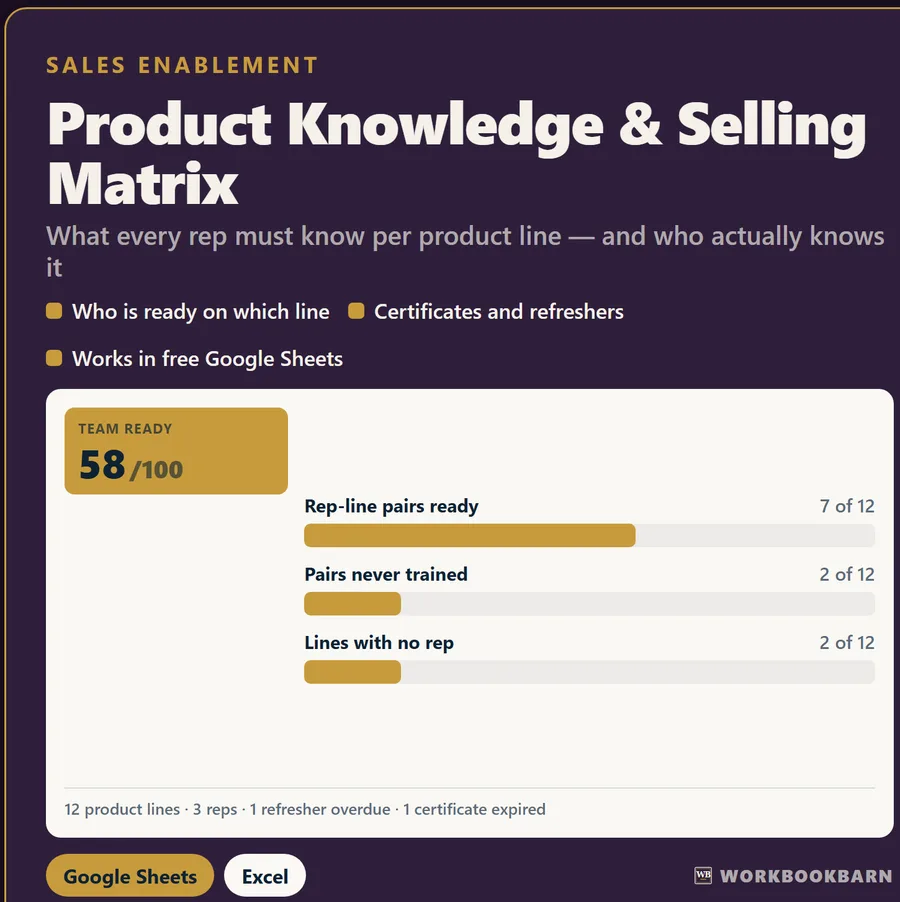
What it does
Inside the workbook.
Specs, warranty, three selling points, the objection and the answer — per product line.
WHAT YOU GET
- A 5-tab workbook: START HERE · PRODUCT LINES · REP READINESS · DASHBOARD · FAQ
- 2 charts that update themselves as you type
- Realistic example figures already filled in, so you can watch it work before you replace them
- A plain-English START HERE guide built into the file, plus a 11-question FAQ
WHY THIS ONE
- Works in FREE Google Sheets. Also opens in Excel. No add-ons.
- One-time purchase. No subscription, no account, no upsell.
- Nothing connects to your bank or your software. You type the numbers in yourself.
- Input cells are unlocked and formulas are protected so a stray paste cannot break the math — and there is NO password, so you can unlock and change anything.
- Every formula was opened in a calculation engine, fully rebuilt, and checked against values worked out independently of the file. If one disagreed, it would not be on sale.
HOW IT WORKS
1. Download and open the file. Nothing to unzip.
2. Read the START HERE tab — about two minutes.
3. Type your numbers over the examples in the blue cells.
GOOGLE SHEETS
File > Import > Upload > choose the file > Replace spreadsheet. No XLOOKUP, no LAMBDA, nothing that breaks on import.
INSTANT DOWNLOAD
Available immediately after purchase under Purchases and Reviews. Nothing ships.
REFUNDS AND SUPPORT
Instant digital downloads cannot be returned automatically through Etsy. Message me — if something is broken or not what you expected, I will fix it or refund you.
AI DISCLOSURE
This workbook was built with AI assistance. Every formula in it was then opened in a calculation engine and tested against independently calculated values before it was listed. The math is checked, not assumed.
This is a digital file only. No physical item will be shipped.
The proof
Every figure, worked out twice.
Before this workbook was listed it was opened in a calculation engine, rebuilt, and every headline figure was compared to a value computed independently in code from the same seed inputs. This is an excerpt of that ledger.
- BuildGenerated from a written spec, opened in a calculation engine, fully rebuilt.
- RecomputeEach figure worked out again in code, never read back from the sheet.
- CompareCell by cell, to a stated tolerance. One disagreement and it does not go on sale.
| Sheet | Cell | Expected | Calculated | Figure | |
|---|---|---|---|---|---|
| PRODUCT LINES | L5 | 3 | 3 | ✓ | Laminate shingle: 3 reps assigned |
| PRODUCT LINES | M5 | 3 | 3 | ✓ | Laminate shingle: 3 reps ready |
| PRODUCT LINES | N5 | 1 | 1 | ✓ | Laminate shingle: coverage |
| PRODUCT LINES | L11 | 1 | 1 | ✓ | Ridge vent: 1 rep assigned |
| PRODUCT LINES | O11 | 1 | 1 | ✓ | Ridge vent: 1 still to train |
| PRODUCT LINES | L13 | 1 | 1 | ✓ | Pipe boot: 1 rep assigned |
| PRODUCT LINES | O13 | 1 | 1 | ✓ | Pipe boot: 1 still to train [date] |
| PRODUCT LINES | M14 | 1 | 1 | ✓ | Step flashing: 1 ready |
Questions
Before you buy.
Why are there no manufacturer names in it?
Because yours are not mine. The twelve example lines are generic on purpose — a laminate shingle, an underlayment, a ridge vent. You type your own manufacturers, product names, specs and warranty terms over them. It also means the file does not go stale the day a supplier renames a programme.
Does this tell me which certifications my reps need?
No, and be careful with anything that claims it does. This is a tracking tool. Certification and training requirements come from your own manufacturers and your own contracts. Licence requirements come from your own state board. Insurance requirements come from your own insurer and from the contracts you sign. Look those up at the source, then type the answers in here so they live in one place.
Where do I get the warranty terms to type in?
Off the current warranty document from the manufacturer, every time. Warranty terms and the conditions attached to the enhanced tiers change, and a term written down two years ago is a promise your rep should not be making. This sheet stores what you type; it has no way of knowing when it went out of date.
Will it work in free Google Sheets?
Yes. File > Import > Upload > choose the file > Replace spreadsheet. Every formula was written to work in Google Sheets as well as Excel — no XLOOKUP, no LAMBDA, no add-ons, nothing to subscribe to.
Why can't I type in some cells?
Those are formulas, locked so a stray paste cannot break the math. There is no password. Review > Unprotect Sheet opens the whole thing if you want to change something.
Does it work in free Google Sheets?
Yes. Every workbook is built with an older, universal formula vocabulary so it imports into free Google Sheets without add-ons, and it opens in Excel as well. You get both in one purchase.
How was it tested?
The workbook was opened in a calculation engine, fully rebuilt, and 31 figures were compared to values worked out independently in code from the same seed inputs. One disagreement would have stopped the release. An excerpt of that ledger is on this page.
Get it
Product Knowledge & Selling Matrix, $14.99
Instant download on Etsy. Google Sheets and Excel versions in the same purchase. No subscription, ever.
Educational estimates only. These calculators and workbooks do the arithmetic on the figures you enter; they are general-purpose tools, not financial, investment, tax, legal, lending, insurance or construction advice, and no result is a quote, an offer, or a guarantee of any outcome. Results depend entirely on your inputs and assumptions. Verify anything you intend to rely on with a licensed professional — a CPA, attorney, lender, licensed contractor, or your own agent. WorkbookBarn and Marcos Gil accept no liability for decisions made using these tools. Marcos Gil is a licensed Kentucky real estate agent (License No. 296259) and is not a lender, CPA or attorney.